Explain every page
A clear teaching explanation for deeper understanding.
For lecture slides, papers, and dense study PDFs
Get clear, detailed AI summaries or explanations that preserve what matters—without the manual work. Upload your material and understand it in a fraction of the time.
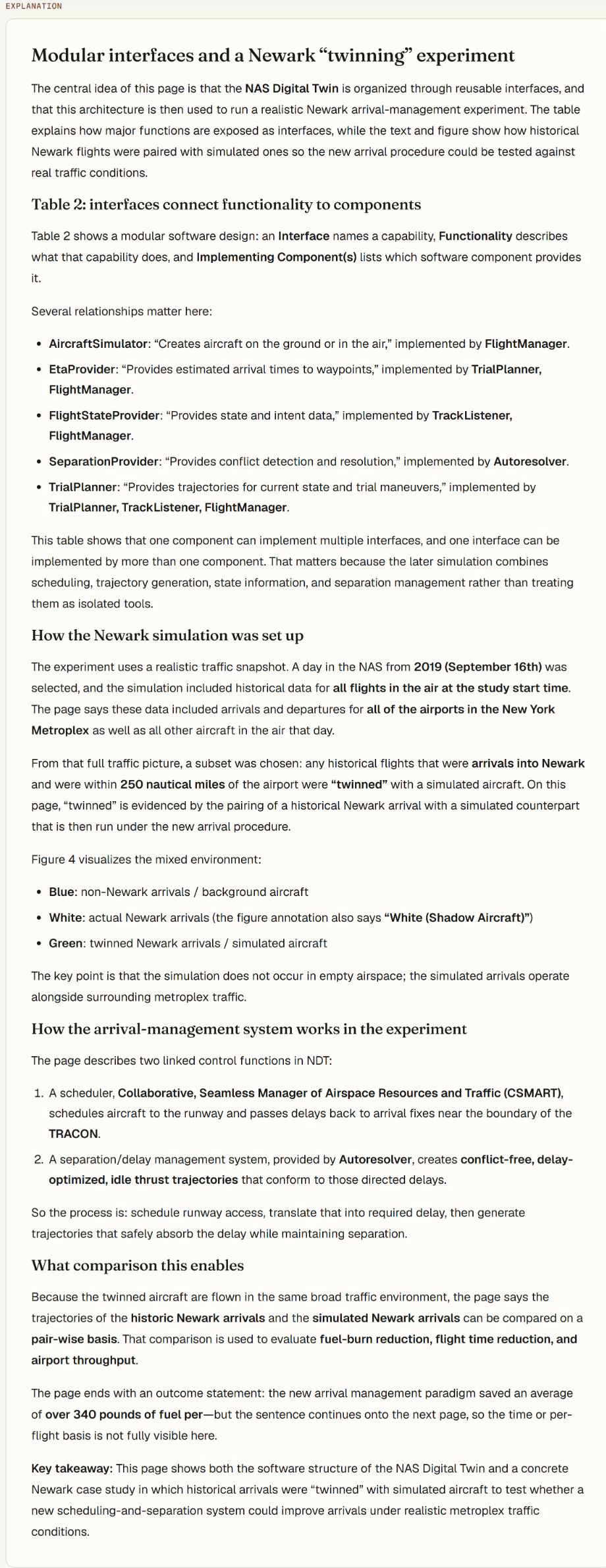
A full teaching explanation beneath each original page.
Demo video
A quick look at turning a dense PDF into a clear, structured study guide.
The whole point
Page by page - charts, tables, formulas, and page references stay attached to the notes they support.
The usual AI summary
Generic AI tools often compress an entire PDF into one short response. Important details disappear, some pages receive little attention, and charts, formulas, or examples may not be covered. What remains is usually a loose block of text instead of a structured guide you can actually study from.
How it works
Upload once. Choose what you need. Read the result beside every original page.
A clear teaching explanation for deeper understanding.
A detailed summary of every page, with the important points easy to review.
Let StudyLayer create it automatically, or use your own Claude account.
How Claude connects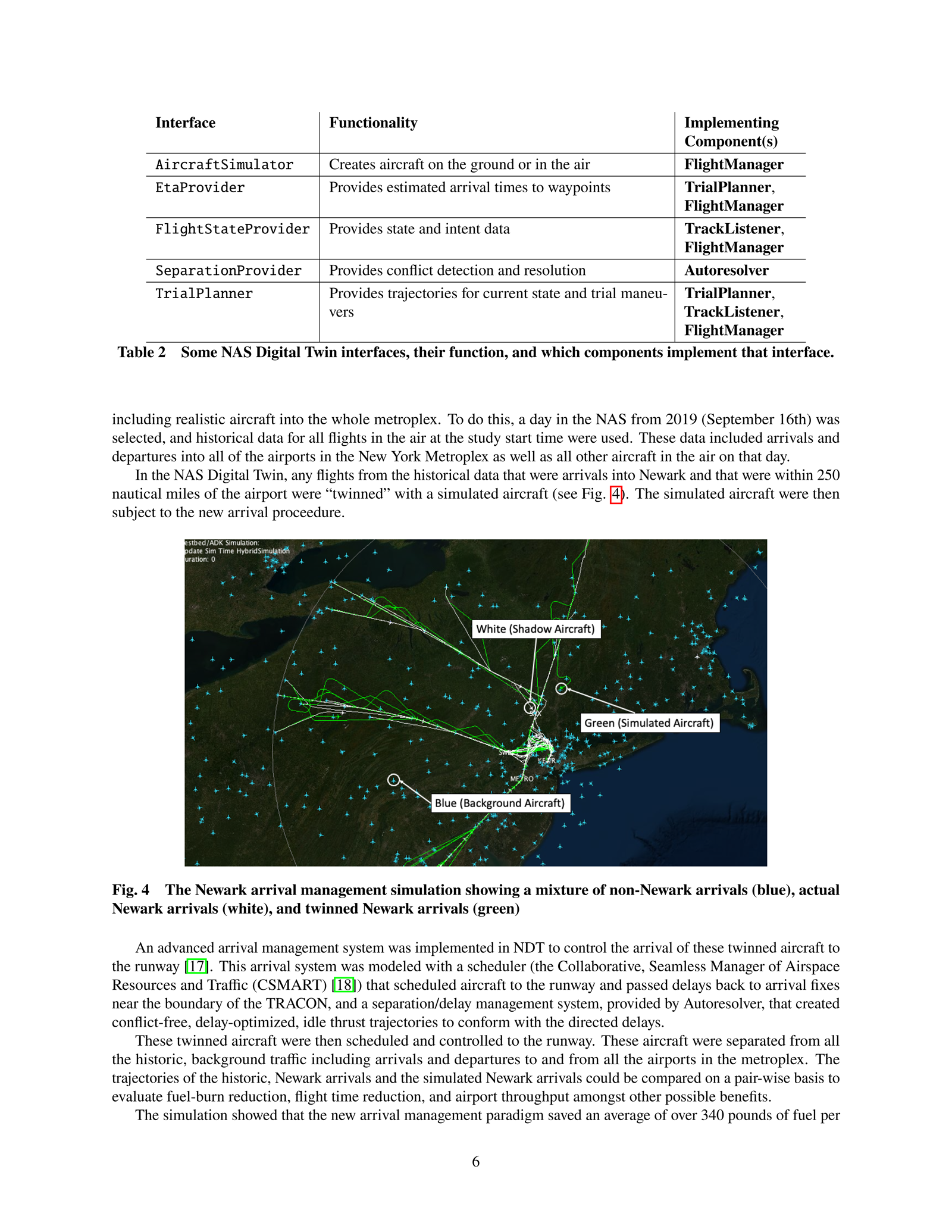
Pricing
Free includes both workflows. Connected expands MCP use; Pro combines MCP with automatic OpenAI generation for heavier study loads.
$0one-time access
If you want to try StudyLayer on one complete lecture.
How this plan works
Use automatic mode, or connect Claude and let your own AI write the guide. No card.
One-time access, any mix of
Free allowances do not reset. No card or countdown.
$8per month
If you want your Claude account to write the guide.
How this plan works
Your Claude account writes the notes page by page. StudyLayer prepares and checks each response, making the finished guide more structured and consistent.
MCP only. StudyLayer’s OpenAI API generation is not included.
Each month
Uses your Claude plan’s own usage, not a StudyLayer allowance.
$20per month
If you want StudyLayer to build the complete guide for you.
How this plan works
Use StudyLayer’s managed OpenAI API—currently our strongest and most consistent workflow—or switch to the included Claude MCP connection.
Each month
Use the monthly automatic allowance for up to 300 detailed pages, 600 summarized pages, or 1,200 pages of whole-PDF summary.
Everything in Connected, plus:
Every plan keeps notes tied to their source page and exports to PDF.
Free, Connected, and Pro include MCP access. Only Claude is supported today; it requires custom-connector access, is billed separately, and Anthropic controls its availability and usage limits.
Connected does not include StudyLayer-funded OpenAI API generation. Choose Pro if you prefer automatic OpenAI responses as well as MCP.
For now, Automatic mode through StudyLayer’s managed OpenAI API generally produces stronger, more consistent guides than Connected mode. Results still vary by PDF.
Automatic mode includes page-by-page explanations, page-by-page summaries, and whole-PDF summaries. Connected mode remains page-by-page for now.
One detailed page uses as much as two summarized pages, so an allowance stretches further on lighter formats.
Free Automatic and connected-page allowances are one-time and do not reset. Connected and Pro amounts reset on the 1st of each month and do not carry over. Reopening a finished guide never uses them again.
Prices in USD. Tax is added at checkout by Paddle, our reseller. Cancel anytime — paid access runs to the end of the billing period.
Questions
Only the pages you generate notes for. Uploading, re-reading a finished guide, or switching the reader layout costs nothing.
Only for connected mode. Free and Pro can also generate automatically; Connected uses your Claude account. ChatGPT is not supported yet.
Lecture slides, papers, and study chapters — including scans, where the text is recovered first. Guides are available in 21 languages.
Yes, from your account at any time. Paid access continues to the end of the billing period, then the account returns to Free.
One-time Free access, no card. Try a complete lecture of up to 30 pages.